This post covers pointers in C, then the parts of C that change from one machine to another, then the three places CUDA code leans on both. Each idea gets a rule, a short program, and the output that program printed.
Every C program here was compiled with gcc 13.3 (-std=c17 -Wall -Wextra) on x86-64 Linux and run. Output blocks are pasted unchanged. The CUDA snippets were not compiled, because the machine used for this post has no nvcc. They are marked where they appear.
- memory is numbered bytes
- a pointer stores an address
- reading the syntax
- the declaration trap
- functions get copies
- NULL
- sizeof, arithmetic, pointer to pointer
- what changes between machines
- where cuda uses all this
- cheat sheet and exercises
memory is numbered bytes
Memory is a long row of bytes. Every byte has a number, and that number is its address. Addresses go up by one per byte.
A type decides two things: how many bytes a variable takes, and how those bytes are read. An int is usually 4 bytes, so it sits in 4 neighbouring addresses. The address of the variable is the address of its first byte. sizeof gives the byte count:
snippet
printf("an int uses %zu bytes\n", sizeof(int)); // %zu is the format for size_t
The number you see when you print an address is a virtual address. The operating system maps it to real RAM behind your back. The exact value changes between runs and between machines, so a program never depends on it. It only cares that two addresses are the same or different.
a pointer stores an address
A pointer is a variable whose value is an address. That is the whole definition. Two operators connect values and addresses:
&xgives the address ofx.*pgoes to the address stored inpand uses the thing there.
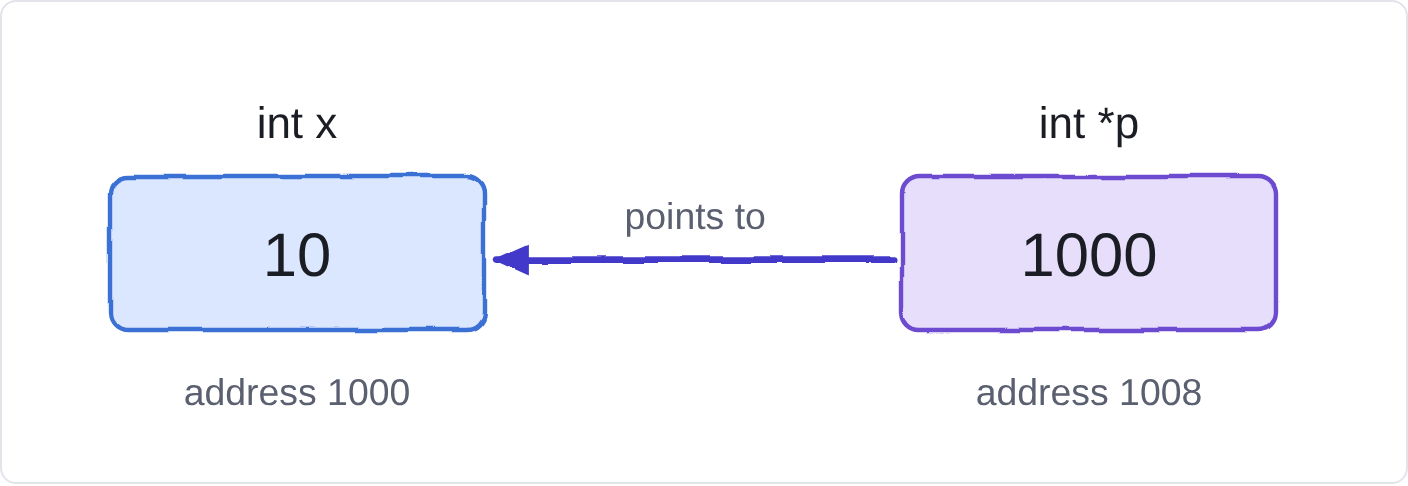
table 1 · the five expressions you need, for int x = 10; int *p = &x;
| expression | what it is | type | value in fig 1 |
|---|---|---|---|
| x | the int itself | int | 10 |
| &x | address of x | int * | 1000 |
| p | the address stored in p | int * | 1000 |
| *p | follow p, use the int there | int | 10 |
| &p | address of p itself | int ** | 1008 |
*p is not a copy of x. It is x, reached by a different route. Reading *p reads x, and writing *p writes x.
basics.c, first part
int i = 10;
int *p = &i;
printf("i = %d, *p = %d, p == &i: %d\n", i, *p, p == &i);

*p = 20;
printf("after *p = 20: i = %d\n", i);
i = 30;
printf("after i = 30:  *p = %d\n", *p);
output of basics.c, pasted unchanged
i = 10, *p = 10, p == &i: 1
after *p = 20: i = 20
after i = 30:  *p = 30
Writing through p changed i, and writing i changed what *p reads. There is one int, with two ways to reach it.
reading the syntax
Most pointer confusion is grammar, so here is the grammar. A declaration is written the way the variable will be used:
int *p;reads as "*pis an int", sopis a pointer to int.int a[10];reads as "a[i]is an int", soais an array of ints.
The same symbol does different jobs depending on where it sits:
table 2 · one symbol, different jobs
| symbol | where | meaning |
|---|---|---|
| * | in a declaration: int *p | p is a pointer |
| * | before one expression: *p | follow the address (dereference) |
| * | between two values: a * b | multiply |
| & | before one variable: &x | address of x |
| & | between two values: a & b | bitwise AND |
Both sides of an assignment need the same type. p = &x; works because &x has type int *, the same as p. p = 20; mixes an int into an int *, and the compiler complains.
Also note what each form changes. p = &y; changes where p points. *p = 5; changes the int that p points at.
the declaration trap
The * belongs to the variable name, not to the type. So this line declares one pointer and one plain int:
snippet
int *a, b; // a is int *, b is int
Writing int* a, b; means exactly the same thing, which is why that spelling misleads people. Here is a quiz: in int *a, b, c, *d, e, *f, g, h, *i; the pointers are a, d, f and i. The rest are ints. The program confirms the first case:
output of basics.c, pasted unchanged
int *a, b; sizeof a = 8, sizeof b = 4
When you declare pointers, one declaration per line avoids the mistake entirely.
functions get copies
C copies every argument into the function's parameter. A function that receives an int changes only its own copy. To let a function change the caller's variable, pass the variable's address. The function gets a copy of the address, and both copies lead to the same variable.
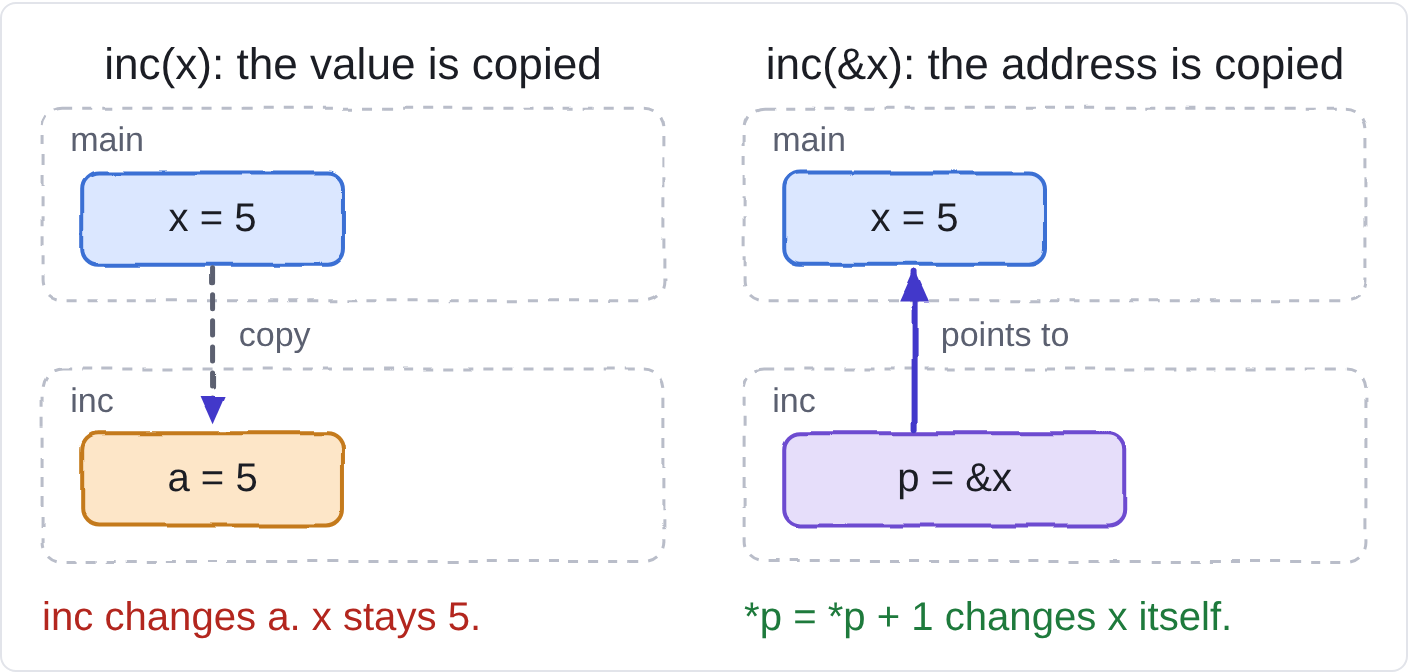
basics.c, functions
static void inc(int *p) { *p += 1; }

static void swap_broken(int a, int b) { int t = a; a = b; b = t; }
static void swap_ok(int *a, int *b)    { int t = *a; *a = *b; *b = t; }

/* p is a COPY of the caller's pointer, so this only changes the copy */
static void reassign(int *p, int *other) { p = other; }
output of basics.c, pasted unchanged
after inc(&i): i = 31
swap_broken:   x = 1, y = 2
swap_ok:       x = 2, y = 1
after reassign: *r = 1 (r still points at m)
swap_broken swaps two copies and the caller sees nothing. swap_ok swaps the originals through their addresses.
reassign shows the second rule. The pointer itself is also a copy, so assigning to p inside the function does not move the caller's pointer. gcc even warns about it:
compiler warning for reassign, pasted unchanged
basics.c:10:27: warning: parameter 'p' set but not used [-Wunused-but-set-parameter]
   10 | static void reassign(int *p, int *other) { p = other; }
The two rules together:
- To change the caller's thing, pass a pointer to it (
T *). - To change the caller's pointer, pass a pointer to the pointer (
T **).
Rule 2 is exactly how cudaMalloc works. It comes back in the CUDA section.
NULL
Any pointer can be set to NULL, which means "points to nothing". Three rules cover it:
- A pointer you have not assigned holds garbage. Give it a real address or
NULLright away. - Dereferencing
NULLis undefined behavior. It usually crashes, but the language does not promise that. - Check before you use a pointer that might be
NULL, and set a pointer toNULLafter you free what it pointed at.
basics.c
int *np = NULL;
if (np == NULL) printf("np is NULL, so we do not dereference it\n");
output of basics.c, pasted unchanged
np is NULL, so we do not dereference it
sizeof, arithmetic, pointer to pointer
sizeof works on the type of an expression. For int *p, sizeof p is the size of a pointer and sizeof *p is the size of an int. The second form never actually dereferences p. It only asks for the type. Allocation code uses it so the size follows the pointer's type automatically: malloc(n * sizeof *p).
output of basics.c, pasted unchanged
sizeof p = 8, sizeof *p = 4
Pointer arithmetic moves in units of the pointed-to type. q + 1 is the address of the next int, which is 4 bytes later, not 1. This is how arrays work: arr[2] is defined as *(arr + 2).
basics.c
int arr[4] = {10, 20, 30, 40};
int *q = arr;
printf("arr[2] = %d, *(arr + 2) = %d, *(q + 2) = %d\n", arr[2], *(arr + 2), *(q + 2));
printf("q + 1 is %td bytes after q\n", (char *)(q + 1) - (char *)q);
output of basics.c, pasted unchanged
arr[2] = 30, *(arr + 2) = 30, *(q + 2) = 30
q + 1 is 4 bytes after q
Pointer to pointer follows from rule 2. &p has type int **, and each * follows one level:
basics.c
int **pp = &p;
**pp = 99;        // pp -> p -> i, so this writes i
printf("after **pp = 99: i = %d\n", i);
output of basics.c, pasted unchanged
after **pp = 99: i = 99
what changes between machines
The C standard does not fix most sizes and layouts. It sets minimums and lets the compiler, CPU and operating system decide the rest. Code that works on your laptop can behave differently on another machine, and CUDA code always runs on at least two (CPU and GPU), so this matters here.
This program prints what this machine chose:
platform.c
#include <stdio.h>
#include <stddef.h>
#include <stdint.h>
#include <limits.h>

struct bad  { char a; int b; char c; };
struct good { int b; char a; char c; };

#define SHOW(t) printf("  %-10s %zu\n", #t, sizeof(t))

int main(void) {
    printf("sizes in bytes\n");
    SHOW(char);
    SHOW(short);
    SHOW(int);
    SHOW(long);
    SHOW(long long);
    SHOW(float);
    SHOW(double);
    SHOW(void *);
    SHOW(size_t);

    uint32_t v = 0x01020304;
    unsigned char *bytes = (unsigned char *)&v;
    printf("\nbyte order\n");
    printf("  0x01020304 in memory: %02x %02x %02x %02x\n", bytes[0], bytes[1], bytes[2], bytes[3]);
    printf("  this machine is %s-endian\n", bytes[0] == 0x04 ? "little" : "big");

    char c = (char)200;
    printf("\nplain char\n");
    printf("  %s (CHAR_MIN = %d)\n", CHAR_MIN < 0 ? "signed" : "unsigned", CHAR_MIN);
    printf("  (char)200 reads back as %d\n", c);

    printf("\nstruct layout\n");
    printf("  struct bad   size %2zu   a=%zu b=%zu c=%zu\n", sizeof(struct bad),
           offsetof(struct bad, a), offsetof(struct bad, b), offsetof(struct bad, c));
    printf("  struct good  size %2zu   b=%zu a=%zu c=%zu\n", sizeof(struct good),
           offsetof(struct good, b), offsetof(struct good, a), offsetof(struct good, c));
    return 0;
}
output of platform.c, pasted unchanged
sizes in bytes
  char       1
  short      2
  int        4
  long       8
  long long  8
  float      4
  double     8
  void *     8
  size_t     8

byte order
  0x01020304 in memory: 04 03 02 01
  this machine is little-endian

plain char
  signed (CHAR_MIN = -128)
  (char)200 reads back as -56

struct layout
  struct bad   size 12   a=0 b=4 c=8
  struct good  size  8   b=0 a=4 c=5
sizes
table 3 · type sizes: measured here vs what C promises
| type | bytes here | what C guarantees | seen elsewhere (not measured here) |
|---|---|---|---|
| char | 1 | exactly 1 byte, by definition; at least 8 bits | – |
| short | 2 | at least 16 bits | – |
| int | 4 | at least 16 bits | 2 bytes on some small microcontrollers |
| long | 8 | at least 32 bits | 4 bytes on 64-bit Windows |
| long long | 8 | at least 64 bits | – |
| float / double | 4 / 8 | format not fixed by C | IEEE 754 on almost every machine |
| void * | 8 | size not fixed | 4 bytes on 32-bit systems |
| size_t | 8 | unsigned; big enough for the largest object | 4 bytes on 32-bit systems |
byte order
A multi-byte value occupies consecutive addresses, but C does not say which end goes first. Little-endian machines store the least significant byte at the lowest address. Big-endian machines do the opposite. Network protocols use big-endian, and x86-64 CPUs are little-endian, as the output above shows.
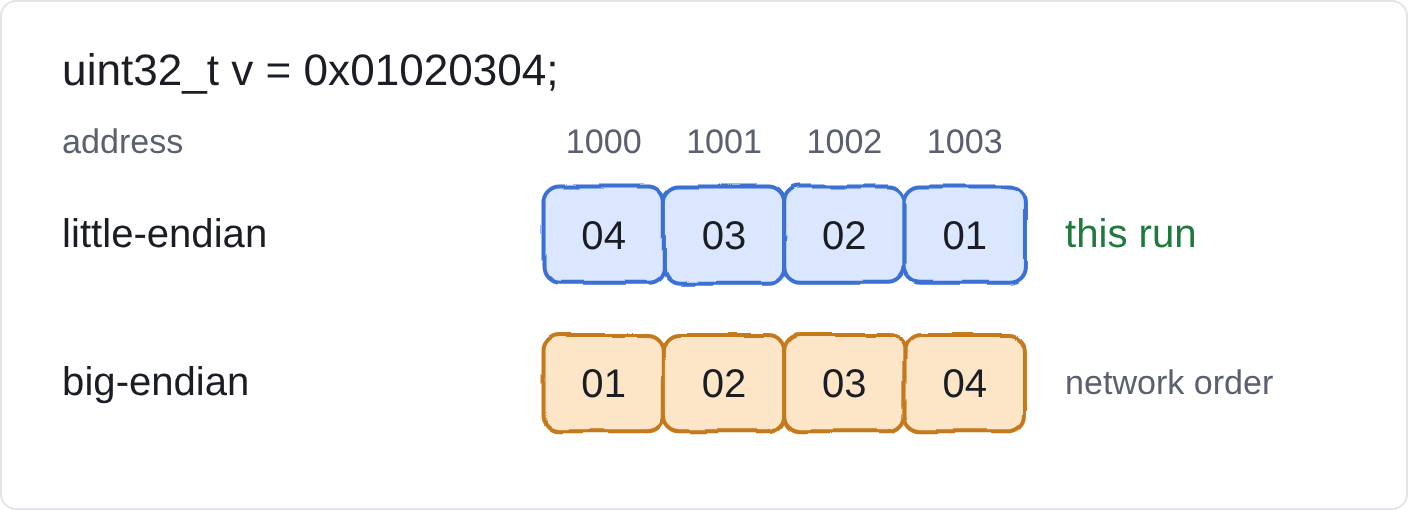
signed or unsigned char
Plain char may be signed or unsigned, depending on the platform. Here it is signed, so (char)200 reads back as -56. On other platforms it can be 200. Use unsigned char for raw bytes, and int8_t or uint8_t when you want a specific signedness.
struct padding
CPUs prefer values at addresses that are multiples of their size, so the compiler inserts unused padding bytes between struct fields. The same three fields take 12 bytes or 8 bytes depending only on their order:
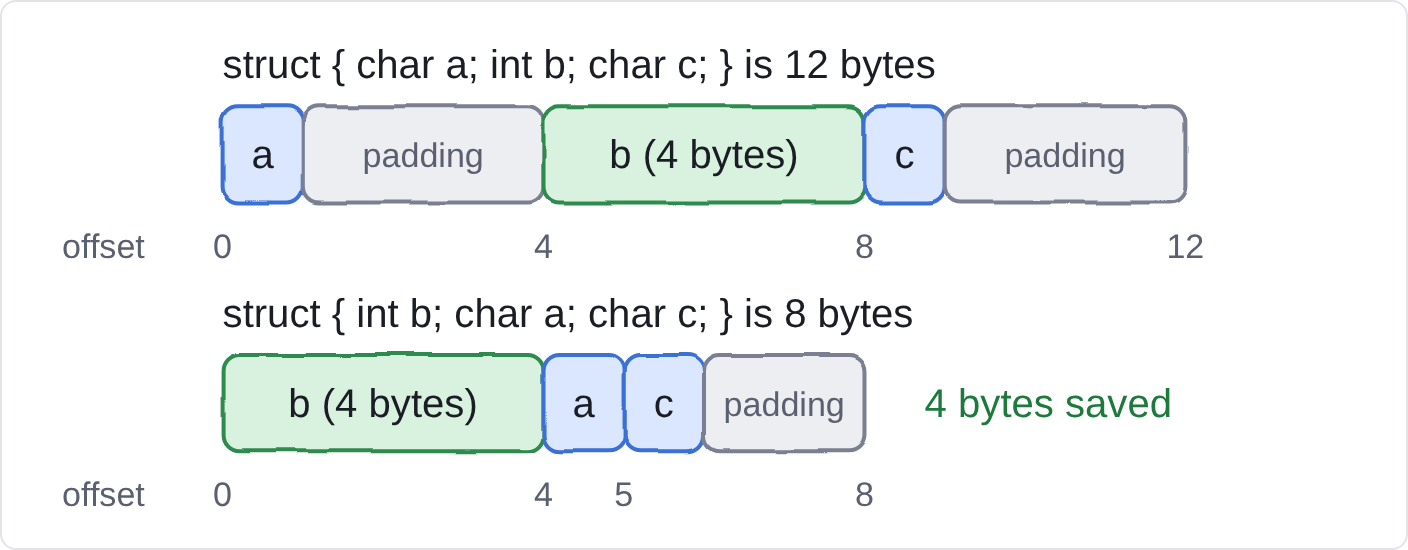
three kinds of "the standard does not say"
table 4 · how much freedom the compiler has
| kind | meaning | example | can you rely on it? |
|---|---|---|---|
| implementation-defined | compiler must pick one behavior and document it | sizeof(int), plain char signedness | only on that compiler and platform |
| unspecified | compiler picks one of several, need not say which | order in which f(a(), b()) evaluates its arguments | no |
| undefined | the standard puts no limit on what happens | dereferencing NULL, signed overflow, reading past an array | never; the bug may appear only under some optimization levels |
habits that keep code portable
- Use
<stdint.h>types (int32_t,uint8_t,uint64_t) whenever the exact size matters. - Use
size_tfor sizes and counts, and print it with%zu. - Write
sizeofinstead of 4 or 8. Prefersizeof *ptosizeof(int), so the size follows the type. - Take limits from
<limits.h>instead of guessing. - Never rely on byte order. To read a 32-bit value from bytes, use shifts and masks, which behave the same everywhere.
- Use
unsigned charfor raw bytes. - Compile with
-Wall -Wextra, and test with-fsanitize=address,undefinedto catch undefined behavior.
where cuda uses all this
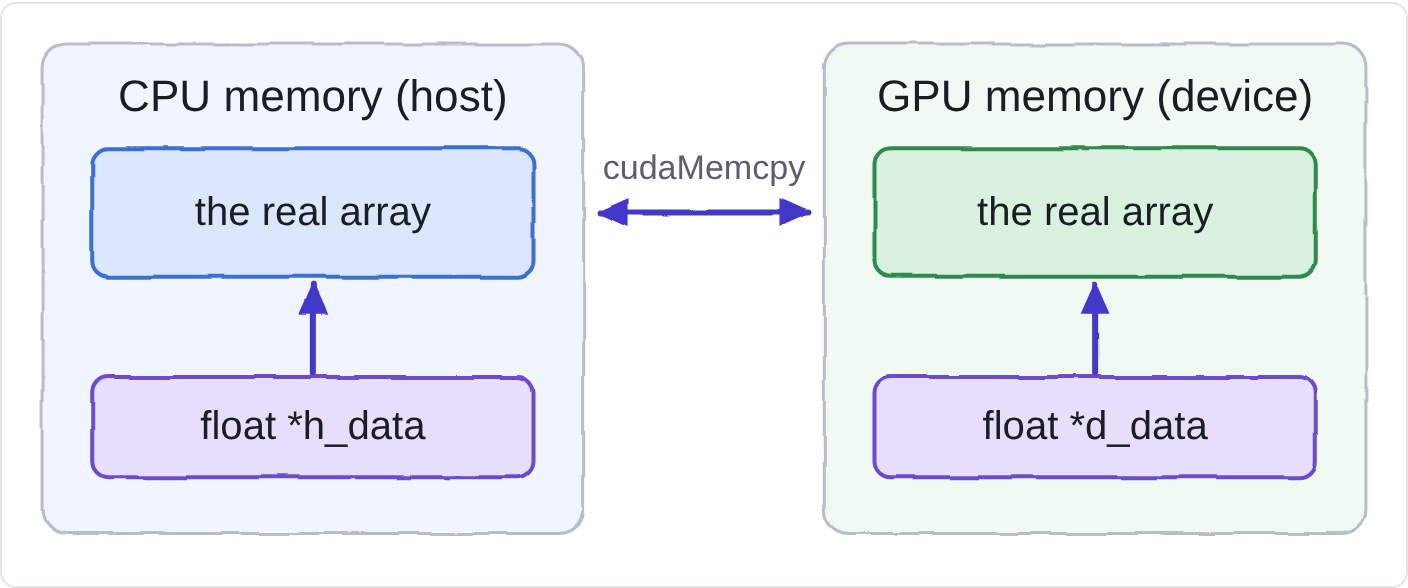
A CUDA program has two processors with two separate memories: the CPU with system RAM (the host), and the GPU with its own memory (the device). Pointers are how your code names locations in each.
1. a device pointer is only valid on the device
d_data is a number like any other pointer. But it is an address inside GPU memory. Dereferencing it in ordinary CPU code reads the wrong place, so it crashes or returns garbage. (CUDA also has a separate feature called managed memory that both sides can use. Plain cudaMalloc memory is not that.) Name your pointers h_ and d_ so you never mix them up.
2. cudaMalloc takes a pointer to your pointer
The signature is cudaMalloc(void **devPtr, size_t size). The function must write a new address into your pointer variable, so by rule 2 from the functions section, it needs that variable's address. This plain-C program has the same shape, using malloc so it can run anywhere:
fakealloc.c
#include <stdio.h>
#include <stdlib.h>

/* same shape as cudaMalloc(void **devPtr, size_t size):
   it writes a pointer INTO the caller's pointer variable, so it needs that variable's address */
static int my_alloc(void **out, size_t bytes) {
    *out = malloc(bytes);
    return *out == NULL;   /* 0 means success */
}

int main(void) {
    float *buf = NULL;
    size_t n = 4;

    if (my_alloc((void **)&buf, n * sizeof *buf) != 0) {
        fprintf(stderr, "alloc failed\n");
        return 1;
    }
    printf("buf is %s after my_alloc\n", buf != NULL ? "not NULL" : "NULL");

    for (size_t i = 0; i < n; i++) buf[i] = (float)i * 1.5f;
    for (size_t i = 0; i < n; i++) printf("buf[%zu] = %.1f\n", i, buf[i]);

    free(buf);
    buf = NULL;
    return 0;
}
output of fakealloc.c, pasted unchanged
buf is not NULL after my_alloc
buf[0] = 0.0
buf[1] = 1.5
buf[2] = 3.0
buf[3] = 4.5
buf started as NULL and ended up holding a real address, because my_alloc wrote through &buf. Note n * sizeof *buf: the byte count is derived from the pointer's type, which is the habit from the platform section.
3. cudaMemcpy moves bytes, so you supply the byte count
The order is destination, source, byte count, direction. The count is the number of elements times sizeof one element. Getting the count wrong (for example forgetting to multiply by the element size) copies too little, and nothing warns you.
a complete example
This adds two arrays on the GPU. It was not compiled for this post (no nvcc available), but it uses only the calls described above. Read it and match each pointer to Fig 5.
vecadd.cu · not compiled here
#include <stdio.h>
#include <stdlib.h>

#define CHECK(call) do { cudaError_t e = (call); if (e != cudaSuccess) { \
    fprintf(stderr, "%s:%d %s\n", __FILE__, __LINE__, cudaGetErrorString(e)); exit(1); } } while (0)

__global__ void add(const float *a, const float *b, float *c, int n) {
    int i = blockIdx.x * blockDim.x + threadIdx.x;   // which element this thread handles
    if (i < n) c[i] = a[i] + b[i];
}

int main(void) {
    const int n = 1 << 20;
    const size_t bytes = n * sizeof(float);

    float *h_a = (float *)malloc(bytes);             // host pointers
    float *h_b = (float *)malloc(bytes);
    float *h_c = (float *)malloc(bytes);
    for (int i = 0; i < n; i++) { h_a[i] = 1.0f; h_b[i] = 2.0f; }

    float *d_a, *d_b, *d_c;                          // device pointers
    CHECK(cudaMalloc((void **)&d_a, bytes));        // address of the pointer, as in my_alloc
    CHECK(cudaMalloc((void **)&d_b, bytes));
    CHECK(cudaMalloc((void **)&d_c, bytes));

    CHECK(cudaMemcpy(d_a, h_a, bytes, cudaMemcpyHostToDevice));   // dst, src, bytes, direction
    CHECK(cudaMemcpy(d_b, h_b, bytes, cudaMemcpyHostToDevice));

    int threads = 256;
    int blocks = (n + threads - 1) / threads;        // round up so every element is covered
    add<<<blocks, threads>>>(d_a, d_b, d_c, n);
    CHECK(cudaGetLastError());

    CHECK(cudaMemcpy(h_c, d_c, bytes, cudaMemcpyDeviceToHost));
    printf("h_c[0] = %f\n", h_c[0]);                 // expected 3.000000

    cudaFree(d_a); cudaFree(d_b); cudaFree(d_c);
    free(h_a); free(h_b); free(h_c);
    return 0;
}
4. host and device must agree on layouts
If you pass a struct or an array of structs between CPU and GPU, both sides must see the same field sizes, order and padding. Use fixed-width types (int32_t, uint64_t, float) in shared structs instead of long or plain char, and check with sizeof and offsetof as in platform.c.
5. check every return value
CUDA calls return an error code, and failures often show up later as wrong results. The CHECK macro above is the minimum. It is the same discipline as checking malloc for NULL.
cheat sheet and exercises
table 5 · the whole post in one table
| you write | it means |
|---|---|
| int *p; | p is a pointer to int (uninitialized: set it before use) |
| p = \&x; | store the address of x in p |
| *p = 5; | write 5 into the int p points at |
| p = NULL; | p points to nothing; never dereference it |
| f(&x) | let f change x |
| f(&p) | let f change the pointer p (parameter type int **) |
| p + 1 | the next element, sizeof *p bytes later |
| sizeof *p | size of one pointed-to element |
| int *a, b; | a is a pointer, b is an int |
Predict the output on paper first, then run it.
Exercise 1: two pointers, one variable
ex.c
int a = 1, b = 2;
int *p = &a;
int *q = p;
*q = 5;
p = &b;
*p = 7;
printf("a = %d, b = %d\n", a, b);
Answer: a = 5, b = 7. q got a copy of p's address, so *q = 5 wrote into a. Then p moved to b, and *p = 7 wrote into b. (Verified by running it.)
Exercise 2: reassigning a parameter
snippet
void f(int *p) { p = NULL; }
/* after f(ptr), is ptr NULL? */
Answer: no. p is a copy of ptr. To change ptr you would pass &ptr and take an int **.
Exercise 3: sizes on your machine
Print sizeof(int *) and sizeof(int). This machine gave 8 and 4 (verified by running it). If your numbers differ, you have just seen platform dependence.
How this was checked. Compiled with gcc 13.3.0 on Ubuntu 24.04, x86-64, using -std=c17 -Wall -Wextra, at both -O0 and -O2; all three programs printed identical output at both levels. platform.c was later reorganized and re-run on gcc 15.2.0, Ubuntu 26.04, x86-64, with the same flags and no compiler messages; it printed the same values as before. The only compiler message was the reassign warning shown above, which is intended. The CUDA example is not compiled. Platform notes in the "seen elsewhere" column of table 3 come from general knowledge of other platforms and were not measured here.